NSOiOiOS多线程编程(3/4):GCD 2014-01-01
iOS传统的并发编程模型是多线程,不过以线程为最小单位导致的最大的一个问题就是伸缩性不强,尤其是在应用程序要同时运行在单核、双核或者四核平台上的时候;iOS4之后引入了GCD,通过 GCD,开发者不用再直接跟线程打交道了,只需要向队列中添加代码块即可,GCD 在后端管理着一个线程池。GCD 不仅决定着你的代码块将在哪个线程被执行,它还根据可用的系统资源对这些线程进行管理。这样可以将开发者从线程管理的工作中解放出来,通过集中的管理线程,来缓解大量线程被创建的问题。
GCD 带来的另一个重要改变是,作为开发者可以将工作考虑为一个队列,而不是一堆线程,这种并行的抽象模型更容易掌握和使用。
1.dispatch_queue_t
GCD 公开有 5 个不同的队列:运行在主线程中的 main queue,3 个不同优先级的全局后台并行队列,以及一个优先级更低的后台队列(用于 I/O)。 除此之外,开发者还可以手动创建自定义串行和并发队列。

1.1 Main Queue
1 | dispatch_queue_t main_queue = dispatch_get_main_queue(); |
运行在主线程,串行队列
block的执行受主runloop控制,提交的block到下个runloop才会执行
1.2 Global Queue
1 | dispatch_queue_t global_queue = dispatch_get_global_queue(DISPATCH_QUEUE_PRIORITY_DEFAULT, 0); |
有四个优先级,根据情况选择合适的优先级,一般使用默认优先级
对全局队列使用
dispatch_suspend、dispatch_resume、dispatch_set_context、dispatch_barrier_async等无效
1.3 Custom Serial Queue
1 | NSString *label = [NSString stringWithFormat:@"com.Google.DownloadQueue"]; |
block 串行执行,可用于同步
基本上一个串行队列会创建一个线程,大量使用会消耗内存,降低性能,因为线程创建、上下文切换也是需要是 时间的
可以挂起和恢复,
1.4 Custom Concurrent Queue
1 | NSString *label = [NSString stringWithFormat:@"com.Google.DownloadQueue"]; |
同时可执行多个block,同时执行的数量,建立的线程数由GCD控制,线程来源于线程池,所以大量使用不会有性能问题。
可以挂起和恢复
支持
barrier block,可实现对公共资源有效的多读单写。
1.5 队列总结
只用于程序控制,不要当作一般数据结构来用。
一旦入队,则会执行,不能取消,但能挂起
使用同步提交小心死锁
barrier只能barie自定义并行队列,因为串行队列不需要barrier,全局队列要做很多系统的事,barrier全局队列是无效的。利用这个特性可以实现多读单写!
FIFO队列,原子化入列(线程安全),自动出列
如果需要,可以在block中使用 自动释放池.
2.常用GCD APIs
2.1 提交block到队列
1 | dispatch_async(queue, ^{ /* Block */ }); |
使用同步提交时要注意避免产生线程的死锁问题,并且系统会对同步提交做优化,比如在主线程中同步提交到全局队列 = 直接在主线程中执行。
2.2 异步延迟提交
1 | dispatch_after(when, queue, ^{ /* Block */ }); |
其中when的类型是dispatch_time_t,可以通过dispatch_time_t dispatch_time(dispatch_time_t when, int64_t delta);产生相对时间,或者通过dispatch_time_t dispatch_walltime( const struct timespec *when, int64_t delta);产生绝对时间
2.3 多次并发执行一个Block
1 | dispatch_apply(size_t iterations, queue, ^(size_t index){ /* Block */ }); |
2.4
1 | dispatch_suspend(queue); |
2.5 自定义并发队列的Barrier Block
1 | dispatch_barrier_async(concurrent_queue, ^{ /* Barrier */ }); |
注意:如前所述 只对自定义并发队列有作用
使用dispatch_barrier提交到并发队列的block会在之前提交的block都完成之后才开始运行,并且运行过程中会阻塞并发队列。如下图所示:
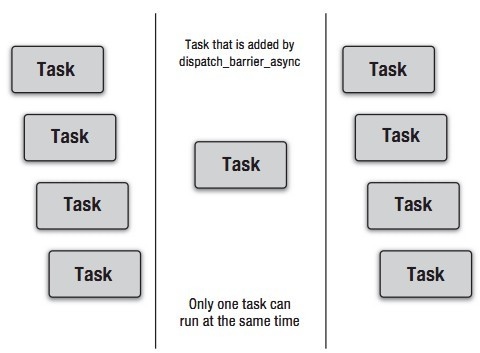
利用Barrier Block可以有效的完成单一资源的多读单写
1 | - (id)objectAtIndex:(NSUInteger)index { |
2.6 dispatch_group
1 | dispatch_queue_t queue = dispatch_get_global_queue(DISPATCH_QUEUE_PRIORITY_DEFAULT, 0); |
2.7 目标队列 (Target Queue)
1 | dispatch_set_target_queue(queue, target); |
这是一个
asynchronous barrier operation默认情况下,一个新创建的队列转发到默认优先级的全局队列中。可以通过设置目标队列来改变优先级。
- 需要注意的是,一个并发队列的目标如果是一个串行队列,那么并发队列里的block将会串行执行。
2.8 其他
除此之外,还有Dispatch Semaphore dispatch_data,dispatch_io,dispatch_source等的相关操作。
3.GCD 的并发实践
3.1 Don’t Block the Main Thread
• Main thread should only handle user interaction and UI
• Keep UI responsive at all times
• Run CPU intensive or blocking code elsewhere
3.2 Run in the Backgroun
1 | // Main Thread |
3.3 Don’t Block Many Background Threads
比如:下面的写法是有问题的
1 | // Main Thread |
这段代码的问题在于你没有办法去取消这个同步的网络请求。它将阻塞住线程直到它完成。如果请求一直没结果,那就只能干等到超时(比如dataWithContentsOfURL:的超时时间是 30秒)。
如果队列是串行执行的话,它将一直被阻塞住。假如队列是并行执行的话,GCD 需要重开一个线程来补凑你阻塞住的线程。两种结果都不太妙,所以最好还是不要阻塞线程。正确的写法应该是这样:
1 | // Main Thread |
网络请求应该都是异步的,一般情况下不要使用同步网络请求,使用下节要提到的NSOperation才是最佳的网络请求实践。
3.4 Integrate with the Main Runloop
1 | - (void)downloadFromRemotePictureViewer:(NSString *)name { |
上面的代码是不能运行的,因为没有将NSNetService加到runloop并启动runloop。正确的做法应该是在主线程中做这些事情。
1 | - (void)downloadFromRemotePictureViewer:(NSString *)name { |
3.5 One Queue per Subsystem
• Subdivide app into independent subsystems
• Control access to subsystems with serial dispatch queues
• Main queue is access queue for UI subsystem
1 | - (void)netServiceDidResolveAddress:(NSNetService *)service { |
3.6 Improve Performance with Reader-Writer Access
• Concurrent subsystem queue
DISPATCH_QUEUE_CONCURRENT
• synchronous concurrent “reads”
dispatch_sync()
• asynchronous serialized “writes”
dispatch_barrier_async()
1 | self.storeQueue = dispatch_queue_create("com.example.imageviewer.store", |
3.7 Separate Control and Data Flow
• Dispatch queues not designed for general-purpose data storage
• No cancellation, no random access
• Use data structures appropriate for problem
3.8 Update State Asynchronously
1 | self.source = dispatch_source_create(DISPATCH_SOURCE_TYPE_DATA_ADD, 0, 0, |
并发实践总结
Don’t block the main thread
Run in the background with GCD and Blocks
Don’t block many background threads
Integrate with the main runloop
Use one queue per subsystem
Improve performance with reader-writer access
Separate control and data flow
Update state asynchronously with dispatch sources